Pixel-perfect UI inspection for designers and front-end developers.
Inspect, measure, and compare any web page against your designs — right in the browser. A Chrome extension for Chrome, Edge, Brave, Arc and Opera.
Turn it on for any tab with one click, or Alt+Shift+K. Works in every Chromium browser — Chrome, Edge, Brave, Arc, Opera — from the same install link.
What it does
Seven tools are free. The four marked Pro are a one-off $20.
- Inspect I
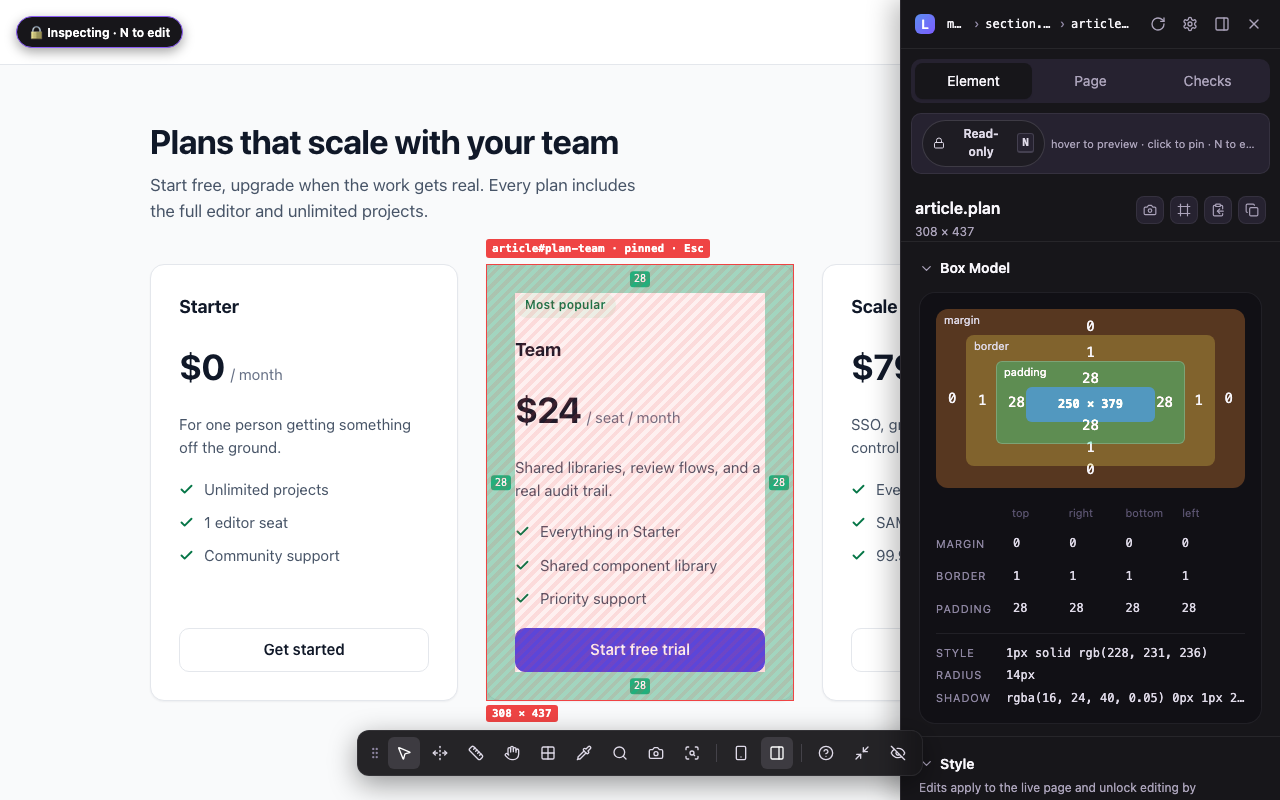
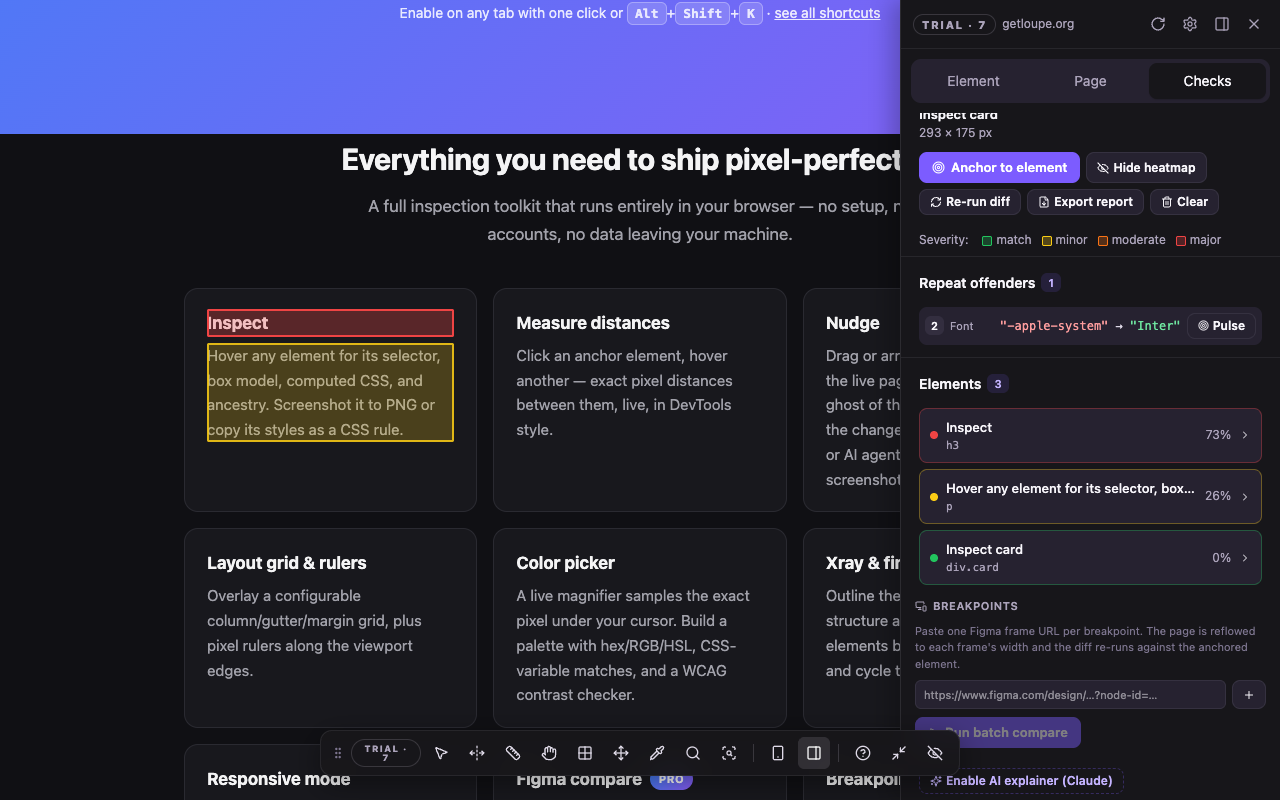
- Hover any element for its selector, box model, computed CSS, and ancestry — read-only, behind a padlock, so the page can't change under you. Click to pin, walk the tree with arrows, screenshot it to PNG with its spacing drawn in, or copy its styles as a CSS rule.
- Measure distances D
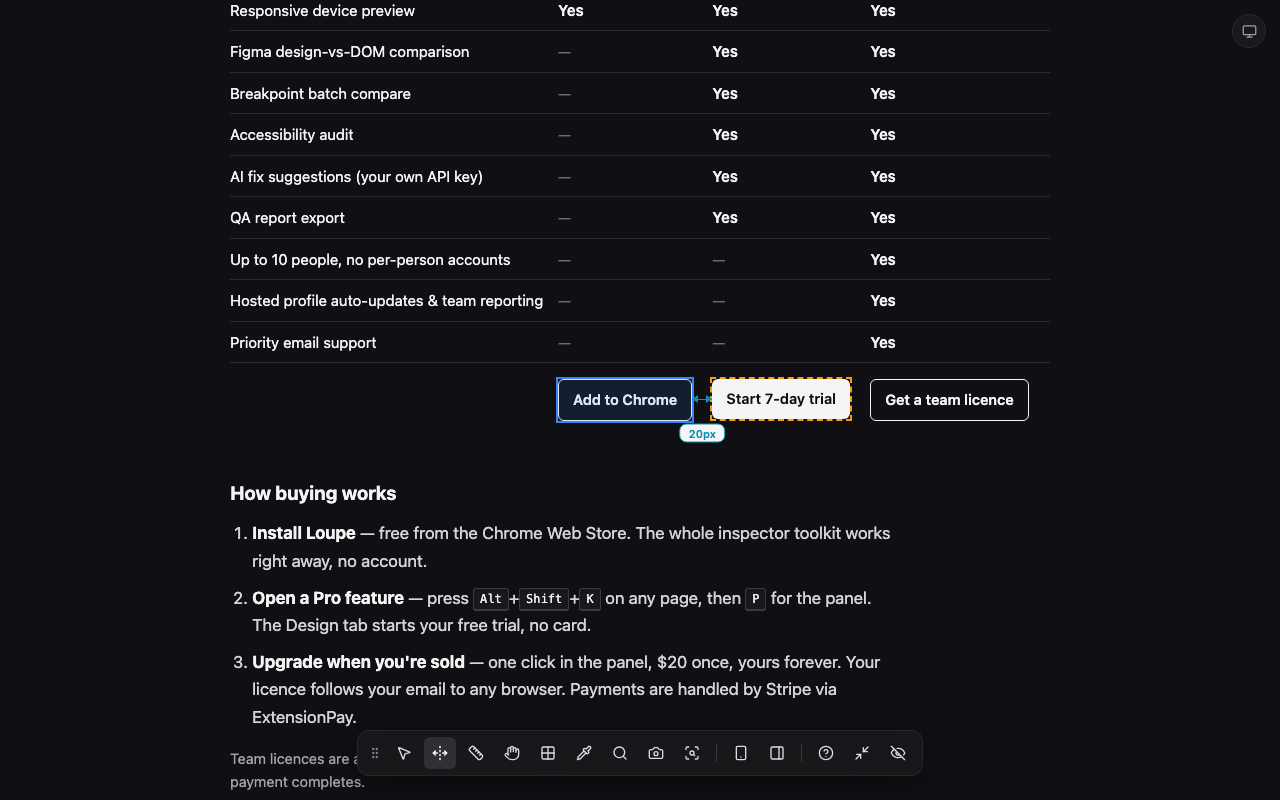
- Click an anchor element, hover another — exact pixel distances between them, live, in DevTools style.
- Edit the page N
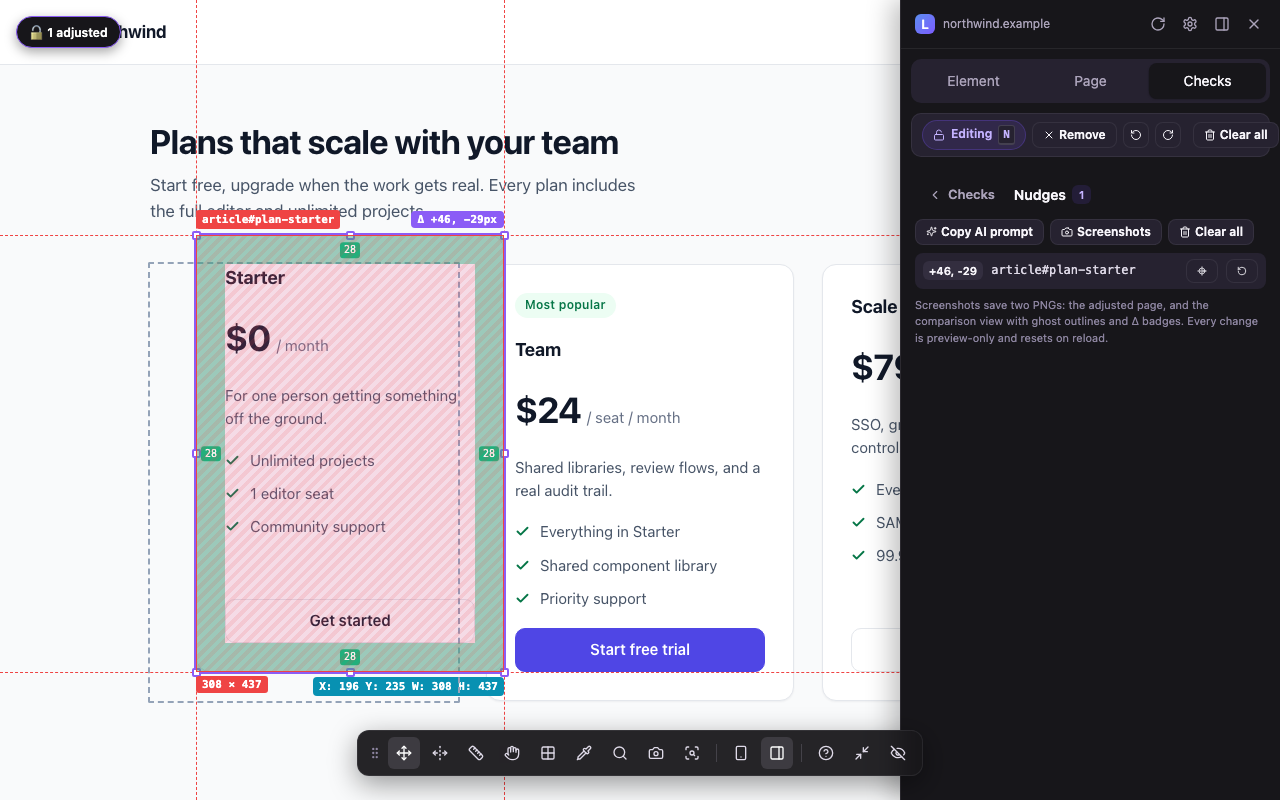
- Open Inspect's padlock and the same mode becomes an editor: drag or arrow-key elements with snapping to their neighbours’ edges, resize by handles, move several as one, duplicate or remove a block to try the layout without it, restyle padding, colour, type and radius — from the panel or right on the page with B — and rewrite text in place. A ghost of the original stays for comparison, ⌘Z undoes, and everything resets on reload — then export the change list as an AI-agent prompt or a PR-ready checklist, with before/after screenshots.
- Layout grid & rulers G R
- Overlay a configurable column/gutter/margin grid, plus pixel rulers along the viewport edges.
- Color picker C
- A live magnifier samples the exact pixel under your cursor. Picked colours become tappable swatches in every colour editor, with hex/RGB/HSL, CSS-variable matches, and a WCAG contrast checker that can load the selected element's own text and background in one click.
- Xray & find X F
- Outline the page's full element structure at a glance, or find elements by text or CSS selector and cycle through matches.
- Responsive mode M
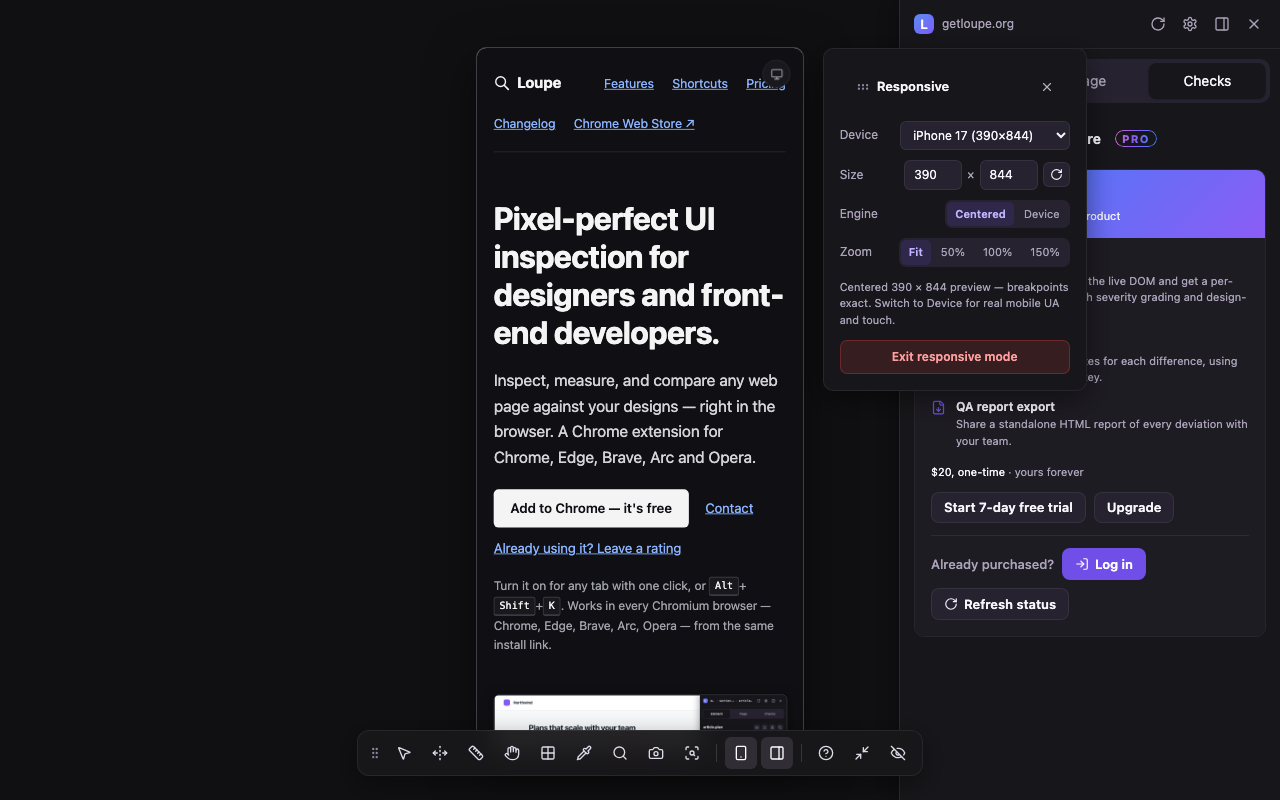
- A centered device preview with 21 presets and zoom — or switch to in-place emulation with real mobile UA and touch for login and SSO flows.
- Figma compare Pro
- Anchor a Figma frame to your live DOM and get a per-element diff heatmap with severity grading and design-token hints.
- Breakpoint batch compare Pro
- Compare one Figma frame per breakpoint: Loupe reflows the page to each width and tabulates the differences.
- Accessibility audit Pro
- Page-wide scan for WCAG contrast failures, missing alt text, small tap targets, unlabeled fields, and heading-order issues.
- AI fix suggestions & QA reports Pro
- Optional AI-written fix suggestions using your own Anthropic API key, and one-click export of a standalone QA report.
Also in there: Tailwind xray S, design-system components O, DS lint L, and a searchable command palette.
Keyboard shortcuts
Press ? while Loupe is running to see this list on the page itself.
| Key | Action |
|---|---|
| Alt+Shift+K | Start / stop Loupe for the current tab |
| Alt+Shift+P | Open the side panel |
| I | Inspect — hover to read, click to pin; opens read-only (the padlock closed) |
| X | Xray |
| G | Layout grid |
| R | Rulers — press again to hide the bars, again to exit |
| D | Measure distances — click an anchor, hover a second element |
| N | The padlock — unlock Inspect to edit the live page; press again to re-lock |
| T | Screenshot the element with its spacing annotations |
| C | Color picker |
| B | Edit the selection's colours in place — text, fill, border (while unlocked) |
| F | Find element |
| S | Tailwind xray |
| O | DS components |
| L | DS lint Pro |
| M | Responsive mode |
| P | Toggle the panel |
| ⌘/Ctrl+K | Command palette (in the panel) — every mode and action, searchable |
| Space | Pause / resume |
| Q | Shutdown current tab |
| H | Hide dock |
| ↑ / ↓ | Walk to parent / child element — or move the element while editing (Shift: ×10) |
| ? | Show this list |
| ⌘Z / ⇧⌘Z | Undo / redo a nudge — on the page or in the panel |
| ⌘C / ⌘V / ⌘⌫ | While editing: duplicate the selected element, or remove it |
| Esc | Exit mode |
Pricing
No subscription for individuals. Pro is $20, once. Try it for 7 days first — no card.
Free $0, forever |
Pro $20 once |
Team $249 / year |
|
|---|---|---|---|
| Element inspector & xray | Yes | Yes | Yes |
| Distance measuring | Yes | Yes | Yes |
| Layout grid & page rulers | Yes | Yes | Yes |
| Color picker with contrast checker | Yes | Yes | Yes |
| Find element | Yes | Yes | Yes |
| Responsive device preview | Yes | Yes | Yes |
| Figma design-vs-DOM comparison | — | Yes | Yes |
| Breakpoint batch compare | — | Yes | Yes |
| Edit across screen sizes (live mirror) | — | Yes | Yes |
| Accessibility audit | — | Yes | Yes |
| AI fix suggestions (your own API key) | — | Yes | Yes |
| QA report export | — | Yes | Yes |
| Design-system lint audit | — | Yes | Yes |
| Up to 10 people, no per-person accounts | — | — | Yes |
| Hosted profile auto-updates & team reporting | — | — | Yes |
| Priority email support | — | — | Yes |
| Add to Chrome | Start 7-day trial | Get a team licence |
How buying works
- Install Loupe — free from the Chrome Web Store. The whole inspector toolkit works right away, no account.
- Open a Pro feature — press Alt+Shift+K on any page, then P for the panel. The Design tab starts your free trial, no card.
- Upgrade when you're sold — one click in the panel, $20 once, yours forever. Your licence follows your email to any browser. Payments are handled by Stripe via ExtensionPay.
Team licences are a self-serve Stripe checkout — your signed licence file is issued the moment payment completes.
Privacy
Everything runs locally in your browser — no analytics, no tracking, no inspection data ever leaves your machine. Figma and Anthropic tokens are optional, stored on-device, and sent only to the API you connect them to. Full privacy policy.